Nintendo Switch 2 Storage Options
Examine the rumored internal storage and expansion options for the Nintendo Switch 2 console.
Examine the rumored internal storage and expansion options for the Nintendo Switch 2 console.
Nintendo Switch 2 Storage Options Explained
Hey there, fellow gamers! Let's talk about something super important for any new console: storage. We all know the pain of running out of space, constantly deleting games, or having to pick and choose what stays on our device. With the Nintendo Switch 2 on the horizon, one of the biggest questions swirling around is, 'How much storage will it have, and how can we expand it?' This guide dives deep into the rumored internal storage, potential expansion methods, and even recommends some top-notch products to keep your game library vast and accessible.
Internal Storage Nintendo Switch 2 What to Expect
The original Nintendo Switch launched with a rather modest 32GB of internal storage, with the OLED model bumping that up to 64GB. While a step up, 64GB still feels pretty tight in today's world of massive game files. Think about games like The Legend of Zelda: Tears of the Kingdom, which clocks in at over 16GB. You can see how quickly that space disappears!
For the Nintendo Switch 2, the rumor mill is buzzing with expectations of a significant upgrade. Many analysts and leakers are pointing towards a base internal storage of at least 128GB, with some even suggesting 256GB. Why the jump? Well, the Switch 2 is expected to be more powerful, capable of running larger, more graphically intensive games. These games naturally come with bigger file sizes. A larger base storage would be a huge quality-of-life improvement, allowing players to download several AAA titles without immediately needing an external solution.
Imagine downloading Metroid Prime 4, a new Mario Kart, and a couple of indie gems without breaking a sweat. That's the dream, right? While 128GB would be a welcome change, 256GB would truly set the Switch 2 apart and provide a much more comfortable starting point for most gamers.
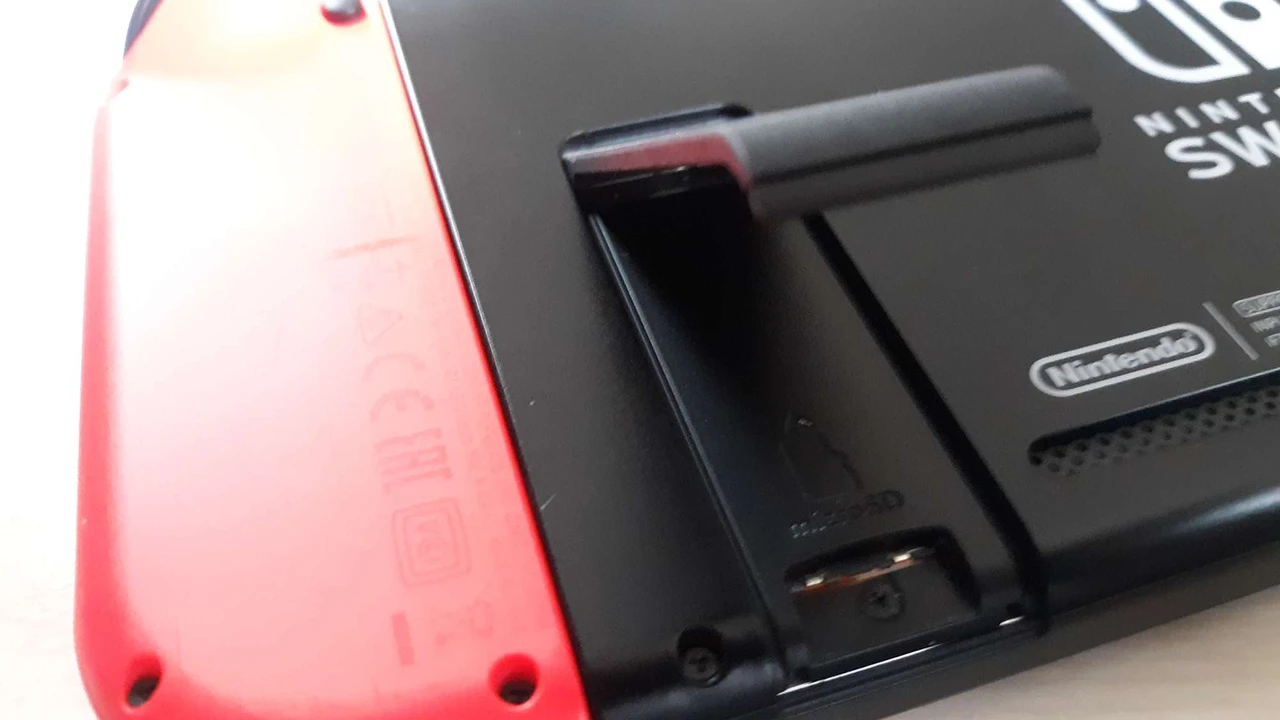
Nintendo Switch 2 MicroSD Card Expansion The Go-To Solution
Just like its predecessor, it's almost a certainty that the Nintendo Switch 2 will continue to support microSD cards for expandable storage. This is fantastic news because microSD cards offer a flexible and relatively affordable way to dramatically increase your console's capacity. The current Switch supports microSDXC cards up to 2TB, and we can expect the Switch 2 to maintain or even exceed this compatibility.
When choosing a microSD card for your Nintendo Switch 2, speed is just as important as capacity. Look for cards with high read and write speeds, typically indicated by 'UHS-I' or 'UHS-III' ratings and speed classes like 'V30' or 'A2'. Faster cards mean quicker game loading times and smoother performance, especially for larger titles.
Top MicroSD Card Recommendations for Nintendo Switch 2
Let's break down some excellent options that are likely to be perfect for your Switch 2, considering different budgets and storage needs:
1. SanDisk Extreme PRO microSDXC UHS-I Card
Capacity Options: 128GB, 256GB, 512GB, 1TB, 2TB
Read Speed: Up to 200MB/s
Write Speed: Up to 140MB/s
Speed Class: U3, V30, A2
Typical Price Range: $25 (128GB) - $300 (2TB)
Why it's great for Switch 2: This is often considered the gold standard for Switch storage. The A2 rating ensures excellent app performance, which translates to faster game loading and smoother gameplay. It's incredibly reliable and widely available. If you want top-tier performance without breaking the bank, especially for the 512GB or 1TB versions, this is your pick. Ideal for gamers who want to download a vast library of AAA and indie titles without compromise.
2. Samsung EVO Select microSDXC UHS-I Card
Capacity Options: 64GB, 128GB, 256GB, 512GB, 1TB
Read Speed: Up to 130MB/s
Write Speed: Varies by capacity, generally good
Speed Class: U3, V30, A2
Typical Price Range: $15 (128GB) - $150 (1TB)
Why it's great for Switch 2: Samsung's EVO Select series offers a fantastic balance of performance and value. While slightly slower than the Extreme PRO in raw numbers, in real-world Switch gaming, the difference is often negligible. It's a very popular choice due to its competitive pricing and strong reliability. Perfect for gamers who need significant storage but are also budget-conscious. Great for a mix of large and small games.
3. Lexar PLAY microSDXC UHS-I Card
Capacity Options: 128GB, 256GB, 512GB, 1TB
Read Speed: Up to 150MB/s
Write Speed: Varies by capacity
Speed Class: U3, V30, A2
Typical Price Range: $20 (128GB) - $130 (1TB)
Why it's great for Switch 2: The Lexar PLAY series is specifically designed for gaming devices, emphasizing fast loading times and smooth performance. It's a solid contender that often comes at a slightly lower price point than SanDisk or Samsung, making it an attractive option for value-oriented buyers. Good for those who want a dedicated gaming card without overspending.
4. PNY PRO Elite microSDXC UHS-I Card
Capacity Options: 128GB, 256GB, 512GB, 1TB
Read Speed: Up to 100MB/s
Write Speed: Up to 90MB/s
Speed Class: U3, V30, A1
Typical Price Range: $18 (128GB) - $120 (1TB)
Why it's great for Switch 2: PNY offers reliable and affordable storage solutions. While its A1 rating is slightly lower than the A2 of the others, it still provides good app performance for gaming. It's a dependable choice if you find it at a good price, especially for larger capacities. Suitable for gamers who prioritize capacity over marginal speed differences and are looking for a good deal.
Choosing the Right Capacity for Your Nintendo Switch 2
This really depends on your gaming habits:
- 128GB: If you primarily play physical cartridge games and only download a few digital titles or smaller indie games, this might suffice, especially if the Switch 2 has 128GB internal storage.
- 256GB: A good starting point for most digital-first gamers. It allows for a decent library of digital games, including a few large AAA titles.
- 512GB: This is the sweet spot for many. It provides ample space for a large digital library, including multiple big-name games, without constant management.
- 1TB or 2TB: For the ultimate digital hoarder! If you plan to download every game that catches your eye and never want to delete anything, these capacities are for you. They offer peace of mind and virtually limitless space for the foreseeable future of the Switch 2.
Nintendo Switch 2 External Hard Drives and SSDs Unlikely but Possible
While microSD cards are the primary expansion method, some gamers wonder about external hard drives or SSDs. The current Switch doesn't natively support external drives for game storage, only for transferring screenshots and videos to a PC. It's highly unlikely the Switch 2 will change this for direct game storage.
Why? Portability is key for the Switch. An external drive would negate that. Also, the USB-C port on the Switch is primarily for charging and video output, not high-speed data transfer for external storage devices in a gaming context. While technically possible, it would require significant software and hardware changes that don't align with Nintendo's design philosophy for a hybrid console.
So, don't hold your breath for plugging in a massive SSD to play games directly from it. Stick to microSD cards for game storage expansion.
Nintendo Switch 2 Cloud Saves and Digital Library Management
Beyond physical storage, cloud saves are a crucial part of modern gaming. Nintendo Switch Online (NSO) currently offers cloud save backups for most games. It's a safe bet that the Nintendo Switch 2 will continue and likely enhance this feature. Cloud saves mean that even if you upgrade your console or something happens to your device, your game progress is safe and can be downloaded to a new system.
Managing your digital library on the Switch 2 will likely be similar to the current system. You'll be able to archive games (delete the game data but keep the icon and save data) to free up space, then redownload them later from the eShop. This is a handy feature for managing your internal and microSD card storage effectively.
Optimizing Your Nintendo Switch 2 Storage Strategy
Here are some practical tips for managing your storage on the Nintendo Switch 2:
- Prioritize Physical vs. Digital: If a game is available physically, consider buying the cartridge. This saves internal or microSD card space for digital-only titles and indie games.
- Archive Games You're Not Playing: Don't be afraid to archive games you've finished or aren't actively playing. You can always redownload them later.
- Check Game Sizes Before Downloading: Before hitting that download button, quickly check the game's file size. This helps you anticipate how much space it will consume.
- Invest in a Large MicroSD Card Early: Don't wait until you're constantly running out of space. A 512GB or 1TB microSD card from the start will save you a lot of headaches down the line.
- Regularly Check Storage Usage: Periodically go into your system settings to see how your storage is being used. This helps you identify space hogs.
The Future of Nintendo Switch 2 Storage
As games continue to grow in size and complexity, storage will always be a hot topic. Nintendo's approach with the Switch 2 will likely be a balance of increased internal storage and continued reliance on affordable, user-expandable microSD cards. This hybrid approach offers flexibility for both casual players and hardcore digital collectors.
The rumored improvements in internal storage, coupled with the robust microSD card support, mean that the Nintendo Switch 2 should offer a much more comfortable and less restrictive storage experience than its predecessor. Get ready to download more games and worry less about space!
:max_bytes(150000):strip_icc()/277019-baked-pork-chops-with-cream-of-mushroom-soup-DDMFS-beauty-4x3-BG-7505-5762b731cf30447d9cbbbbbf387beafa.jpg)